

Free AI Tools Better Than Paid Apps: The Smartest No-Cost AI Stack in 2026
For years, software companies trained users to believe one thing: serious tools require subscriptions.
That logic is starting to collapse.
The AI boom created a strange side effect across the software industry. Premium platforms rushed to lock features behind paywalls while smaller AI startups — and increasingly, open ecosystems — started shipping surprisingly capable free alternatives. In many cases, these free tools are not merely “good enough.” They’re faster, less bloated, easier to use, and sometimes more practical than expensive subscription software people barely utilize fully.
That shift matters most for students, freelancers, creators, bloggers, remote workers, startup founders, and independent professionals trying to reduce monthly software costs without sacrificing quality.
The real question in 2026 is no longer “Can free AI tools compete?”
It’s this:
Which free AI tools are actually better than paid apps people are still wasting money on?
This article breaks down the most genuinely useful free AI tools across writing, design, research, coding, productivity, audio, video, and marketing — with realistic insights instead of hype.
Why Free AI Tools Are Suddenly So Good
A few years ago, free software usually meant limitations everywhere: watermarks, tiny quotas, weak outputs, or aggressive upselling.
AI changed the economics.
Companies like OpenAI, Google, Microsoft, Anthropic, and dozens of open-source communities accelerated model accessibility faster than most subscription platforms expected.
Meanwhile:
- Open-source AI models improved rapidly
- Browser-based AI tools became lightweight and scalable
- GPU costs dropped relative to output quality
- AI startups competed aggressively using free tiers
- Users became subscription-fatigued
The result is a surprisingly strong ecosystem of free AI products that cover real workflows without forcing users into enterprise pricing structures.
Not every free tool is excellent, though. Many are just wrappers around public APIs with flashy landing pages.
The tools below stand out because they solve practical problems consistently.
Best Free AI Writing Tool That Rivals Premium Platforms
ChatGPT
Most people already know OpenAI’s chatbot, but many still underestimate how usable the free tier has become for everyday work.
For students, bloggers, and marketers, it now replaces parts of tools people used to pay separately for:
- Brainstorming platforms
- Basic copywriting tools
- Outline generators
- Research assistants
- Email drafting apps
- Study summarizers
What makes it practical is flexibility.
Instead of locking users into templates like older AI writing software, it adapts across tasks naturally. A student can use it for notes, a freelancer for client pitches, and a YouTuber for script ideation within the same session.
Where It Beats Paid Apps
Many paid AI writing tools still rely on rigid workflows designed around SEO-era content automation. They generate polished but strangely empty copy.
Modern conversational AI feels more usable because it supports iteration instead of one-click output.
Limitations
Free-tier usage caps still exist during peak demand, and long-form consistency varies depending on prompt quality.
Still, for most casual and semi-professional users, paying separately for older “AI writing assistants” is becoming harder to justify.
Get Extra 20% OFF
Launch your website today with ultra-fast, secure & premium hosting from Hostinger. Click to claim your deal!
Best Free AI Design Tool for Non-Designers
Canva AI
Canva quietly turned into one of the most practical AI productivity ecosystems online.
The reason creators love it isn’t because the AI is the most advanced. It’s because the workflow friction is low.
You can generate:
- YouTube thumbnails
- Instagram posts
- Presentations
- Blog graphics
- Resumes
- Product mockups
- Posters
- Short videos
…without opening complicated design software.
For beginners especially, Canva’s AI tools outperform expensive professional suites simply because they reduce decision fatigue.
A lot of premium creative software still assumes users understand layers, masking, typography systems, and asset pipelines. Canva skips most of that complexity.
Best Use Cases
- Bloggers creating featured images
- Students making presentations
- Small businesses designing social posts
- YouTubers building thumbnails quickly
Where Paid Apps Still Win
Advanced motion graphics and high-end branding workflows still belong to tools like Adobe products.
But most users are not building Netflix title sequences. They just need fast, clean creative assets.
The Best Free AI Tool for Research and Studying
Perplexity AI
This is one of the biggest workflow shifts happening quietly among students and researchers.
Instead of searching across ten browser tabs manually, users increasingly start with AI-native research tools.
Perplexity AI combines conversational search with live web sourcing in a way traditional search engines still struggle to streamline.
What makes it valuable:
- Source-linked answers
- Faster research summaries
- Cleaner follow-up questioning
- Reduced information overload
For students especially, it shortens the time between question and understanding.
That matters more than flashy AI image generation for many real-world users.
Why It Feels Better Than Some Paid Research Apps
A surprising number of premium “knowledge tools” became cluttered productivity systems overloaded with dashboards and collaboration layers.
Perplexity stays focused.
Ask a question. Get synthesized answers. Explore sources.
Simple wins.
Free AI Image Generators That People Actually Use
Leonardo AI
Microsoft Designer
Adobe Firefly
The AI image space became crowded fast. Most tools look impressive in demos but become frustrating in practical use.
These three consistently stand out for different reasons.
Leonardo AI
Popular among gaming creators, thumbnail designers, and indie creators because it offers strong stylistic control without overwhelming beginners.
Excellent for:
- Fantasy artwork
- Character concepts
- YouTube assets
- Stylized visuals
Microsoft Designer
Underrated for quick social content and marketing graphics.
It works especially well for:
Get Extra 20% OFF
Launch your website today with ultra-fast, secure & premium hosting from Hostinger. Click to claim your deal!
- Ads
- Promotional banners
- Social media posts
- Fast layout generation
Adobe Firefly
One of the safer choices for commercial workflows because Adobe positioned Firefly around commercially safer training approaches.
Design agencies increasingly care about this due to copyright concerns surrounding generative AI assets.
Best Free AI Video Tool for Creators
CapCut
The rise of short-form content completely changed editing priorities.
Creators no longer optimize only for cinematic quality. They optimize for:
- Speed
- Captions
- Vertical formatting
- Rapid publishing
- Multi-platform output
ByteDance-owned CapCut understands this ecosystem better than many traditional editing suites.
Its AI features now include:
- Auto captions
- AI background removal
- Script-based editing
- Voice enhancement
- Text-to-speech
- Short clip generation
For TikTok, Reels, and Shorts creators, CapCut often feels more efficient than expensive desktop editing software.
Not because it’s technically superior — but because it matches modern creator behavior.
That distinction matters.
Best Free AI Coding Assistant
Codeium
Many developers initially assumed AI coding assistants would remain premium enterprise products.
Then tools like Codeium disrupted that assumption.
For independent developers and students, it provides:
- AI autocomplete
- Multi-language coding help
- Refactoring suggestions
- Documentation assistance
- IDE integrations
The interesting industry shift is this:
AI coding tools are becoming infrastructure, not luxury add-ons.
That’s why free competition is getting intense.
Why Developers Like It
A lot of paid coding assistants became expensive quickly for solo users.
Codeium’s free accessibility helped it gain traction among:
- CS students
- Indie developers
- Startup teams
- Learners experimenting with AI-assisted programming
Best Free AI Tool for Audio Cleanup
Adobe Podcast Enhance
This tool became unexpectedly popular among YouTubers recording in untreated rooms.
You upload rough audio.
The AI cleans background noise, improves vocal clarity, and enhances speech quality automatically.
That sounds small until you realize how many creators struggle with:
- Fan noise
- Echo
- Cheap microphones
- Poor room acoustics
Instead of buying expensive audio plugins, many creators now run dialogue through AI cleanup pipelines first.
It’s one of those tools that quietly saves hours.
Free AI Productivity Tools Replacing Multiple Apps
Notion AI
Google Gemini
Otter.ai
AI productivity software is shifting toward integrated ecosystems rather than standalone tools.
Get Extra 20% OFF
Launch your website today with ultra-fast, secure & premium hosting from Hostinger. Click to claim your deal!
Notion AI
Useful for:
- Notes
- Summaries
- Brain dumps
- Project organization
- Content planning
It’s especially strong for freelancers managing multiple workflows.
Google Gemini
Deep integration across the Google ecosystem gives it practical advantages for users already living inside Gmail, Docs, and Drive.
Otter.ai
Still one of the most practical meeting transcription tools for students, remote workers, and interview-heavy workflows.
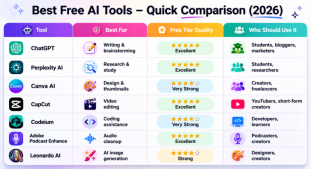
Comparison Table: Free AI Tools Worth Using in 2026
| Tool | Best For | Free Tier Quality | Who Should Use It |
|---|---|---|---|
| ChatGPT | Writing & brainstorming | Excellent | Students, bloggers, marketers |
| Perplexity AI | Research & study | Excellent | Students, researchers |
| Canva AI | Design & thumbnails | Very Strong | Creators, freelancers |
| CapCut | Video editing | Excellent | YouTubers, short-form creators |
| Codeium | Coding assistance | Very Strong | Developers, learners |
| Adobe Podcast Enhance | Audio cleanup | Excellent | Podcasters, creators |
| Leonardo AI | AI image generation | Strong | Designers, creators |
The Hidden Problem With Many Paid AI Apps
A lot of paid AI products are experiencing the same issue SaaS companies faced years ago:
They bundle too many mediocre features together.
Users end up paying for:
- Features they never touch
- Usage quotas they rarely hit
- Workflow complexity they don’t need
Meanwhile, leaner AI tools focus on one task and execute it well.
That’s increasingly what users prefer.
There’s also another shift happening quietly:
People are becoming more skeptical of AI hype.
Users now care less about flashy demos and more about whether a tool actually saves time consistently.
That’s healthy for the industry.
Pros and Cons of Free AI Tools
Pros
- Dramatically lower software costs
- Easier experimentation
- Faster onboarding
- Strong competition improving quality
- Accessible for students and beginners
- Useful for side hustles and creators
Cons
- Usage limits can change anytime
- Some tools add watermarks
- Privacy policies vary significantly
- Long-term reliability isn’t guaranteed
- Advanced enterprise features often remain paid
Who Benefits Most From Free AI Tools?
The biggest winners are not giant corporations.
They’re individuals.
- Students building skills cheaply
- Freelancers reducing overhead
- Bloggers scaling content workflows
- YouTubers speeding up production
- Solo founders automating repetitive tasks
- Small businesses operating lean
AI lowered the barrier to professional-grade productivity tools faster than most industries expected.
That accessibility is arguably more important than the technology itself.
Important Suggestions
Why this shift matters
The most interesting thing about the current AI software landscape is not the technology itself.
It’s the redistribution of capability.
Tools that once required expensive software, technical expertise, or agency-level budgets are now available inside browsers for free or close to it. That changes who gets to create, publish, build, edit, research, and compete online.
Some paid AI platforms still offer real value. Enterprise collaboration, large-scale automation, compliance tooling, and professional production pipelines still matter.
But for millions of everyday users, the smarter move in 2026 is often surprisingly simple:
Use smaller, sharper, free AI tools that solve one real problem well instead of paying subscriptions for bloated software ecosystems you barely use.





💬 Comments (0)
🔒 Please login to post a comment.
Login Now