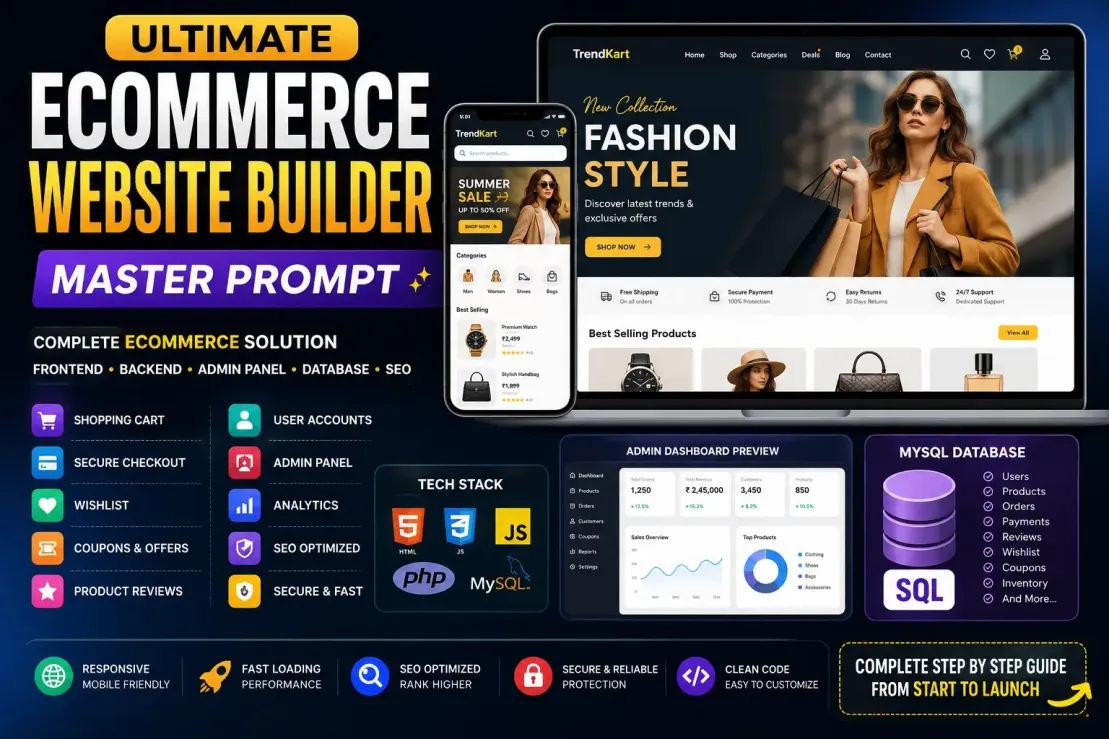
The Ultimate Ecommerce Website Builder Prompt is a powerful AI instruction designed to transform ChatGPT into a complete ecommerce development team. Instead of generating random code snippets, it follows a structured workflow to build a professional online store from the ground up.
What This Prompt Does
Analyzes your ecommerce project requirements first.
Asks for your website name, brand details, business category, and other important information.
Creates a complete project architecture before writing any code.
Generates a professional folder structure for frontend, backend, admin panel, database, and APIs.
Builds each page one by one with detailed explanations.
Creates a fully functional admin dashboard.
Designs and generates SQL database tables with proper relationships.
Explains database connectivity and server configuration.
Implements modern ecommerce features such as cart, checkout, wishlist, coupons, product reviews, and order tracking.
Adds SEO optimization for better search engine rankings.
Includes security best practices to protect user data and transactions.
Provides deployment instructions for shared hosting, VPS, and cloud servers.
Key Features
✅ Complete Ecommerce Website Development
✅ Modern Responsive Design
✅ Admin Dashboard Creation
✅ MySQL Database Design
✅ PHP Backend Development
✅ Shopping Cart System
✅ Checkout & Payment Integration
✅ SEO Optimization
✅ Security Implementation
✅ Performance Optimization
✅ Step-by-Step Explanations
✅ Production-Ready Architecture
Who Should Use It?
Web Developers
Ecommerce Store Owners
Freelancers
Digital Agencies
Startup Founders
Students Learning Full Stack Development
Anyone Building an Online Store
Why This Prompt Is Different
Most AI prompts generate incomplete code or skip important steps. This prompt forces the AI to:
Understand the project first.
Create a proper development plan.
Explain every file and component.
Generate code in a logical sequence.
Build a scalable and maintainable ecommerce platform.
Cover frontend, backend, database, SEO, security, and deployment in a single workflow.
Expected Result
By using this prompt, you can generate a professional ecommerce website with:
Homepage
Product Pages
Cart System
Checkout Process
User Accounts
Admin Panel
Database Structure
SEO Setup
Security Layers
Hosting & Deployment Guide
The final output is a complete roadmap and codebase for building a modern ecommerce platform rather than just isolated code snippets.
📋 Main Prompt
# MASTER PROMPT FOR ADVANCED ECOMMERCE WEBSITE DEVELOPMENT
I want you to act as a Senior Full Stack Ecommerce Architect, UI/UX Designer, Database Engineer, SEO Expert, Security Specialist, and Conversion Rate Optimization Expert.
Before generating any code, first read and analyze this complete prompt.
## PHASE 1 - PROJECT ANALYSIS
First ask me:
1. Website Name
2. Brand Name
3. Business Category
4. Target Country
5. Currency
6. Number of Products
7. Color Theme
8. Logo Style
9. Payment Gateway
10. Shipping Provider
After getting my answers, generate a complete project blueprint.
---
## PHASE 2 - COMPLETE WEBSITE STRUCTURE
First create the entire folder structure.
Example:
project-name/
├── index.html
├── shop.html
├── category.html
├── product-details.html
├── cart.html
├── checkout.html
├── wishlist.html
├── compare.html
├── order-success.html
├── order-tracking.html
├── my-account.html
├── login.html
├── register.html
├── forgot-password.html
├── contact.html
├── about.html
├── faq.html
├── privacy-policy.html
├── terms-and-conditions.html
├── return-policy.html
├── blog.html
├── single-blog.html
├── search.html
├── offers.html
├── careers.html
├── support.html
Admin/
├── dashboard.html
├── products.html
├── add-product.html
├── edit-product.html
├── orders.html
├── customers.html
├── inventory.html
├── coupons.html
├── reviews.html
├── analytics.html
├── settings.html
assets/
├── css
├── js
├── images
├── fonts
database/
├── ecommerce.sql
api/
├── login.php
├── register.php
├── products.php
├── orders.php
├── payments.php
---
## PHASE 3 - DEVELOPMENT RULES
Use:
HTML5
CSS3
JavaScript ES6
PHP 8+
MySQL
AJAX
JSON
Responsive Design
Mobile First Design
Lazy Loading
Schema Markup
Open Graph Tags
Core Web Vitals Optimization
Security Best Practices
SEO Best Practices
Accessibility Standards
Conversion Optimization
Professional Animations
Modern UI/UX
Apple-level Design Quality
Shopify-level Ecommerce Experience
Amazon-level Product Experience
---
## PHASE 4 - PAGE GENERATION SYSTEM
Generate pages one by one.
Never generate all pages together.
For each page provide:
1. Purpose
2. UI Layout Explanation
3. User Flow
4. SEO Strategy
5. Conversion Strategy
6. Security Considerations
7. Full HTML Code
8. Full CSS Code
9. Full JavaScript Code
10. Responsive Design Code
After completing one page, ask:
"Should I continue with the next page?"
Then generate the next page.
---
## PHASE 5 - DATABASE ARCHITECTURE
Before writing SQL:
Explain every table.
Then create:
Users Table
Products Table
Categories Table
Orders Table
Order Items Table
Reviews Table
Wishlist Table
Coupons Table
Payments Table
Shipping Table
Inventory Table
Admins Table
Notifications Table
Blog Table
Settings Table
Audit Logs Table
Create:
Primary Keys
Foreign Keys
Indexes
Constraints
Relations
Optimization Queries
Then provide complete SQL file.
---
## PHASE 6 - DATABASE CONNECTION
Explain step-by-step:
1. Create Database
2. Import SQL
3. Create User
4. Database Credentials
5. Connect MySQL
6. PHP PDO Setup
7. Error Handling
8. Security Settings
Provide complete code.
Example:
config/database.php
Then explain every line.
---
## PHASE 7 - ADMIN PANEL
Create a professional Admin Panel.
Include:
Dashboard
Revenue Analytics
Product Management
Order Management
Inventory Management
Coupon Management
User Management
Review Management
Support Tickets
Notifications
Settings
Roles & Permissions
Activity Logs
Dark Mode
Charts
Graphs
Reports
Export Data
CSV Import
Bulk Product Upload
Generate each admin page separately.
Explain every page before coding.
---
## PHASE 8 - ECOMMERCE FEATURES
Add:
Advanced Search
Mega Menu
Product Filters
Wishlist
Compare Products
Coupon System
Referral System
Reward Points
Email Verification
OTP Login
Social Login
Product Reviews
Ratings
Live Chat
Push Notifications
Recently Viewed
Recommended Products
Flash Sale
Abandoned Cart Recovery
Inventory Alerts
Order Tracking
Invoice Generator
PDF Invoice
Product Zoom
Multi Image Gallery
Quick View
Multi Vendor Ready Architecture
---
## PHASE 9 - PAYMENT SYSTEM
Explain integration:
Stripe
Razorpay
PayPal
Cash on Delivery
UPI
Cards
Net Banking
Generate all backend code.
Explain every step.
---
## PHASE 10 - SEO MASTER IMPLEMENTATION
For every page provide:
SEO Title
Meta Description
Canonical URL
Schema Markup
Breadcrumb Schema
Product Schema
FAQ Schema
Open Graph Tags
Twitter Cards
Robots Tags
Internal Linking Strategy
Image SEO
URL Structure
Core Web Vitals Optimization
EEAT Optimization
Topical Authority Strategy
Programmatic SEO Strategy
---
## PHASE 11 - PERFORMANCE OPTIMIZATION
Implement:
Lazy Loading
Image Compression
Minification
CDN Strategy
Caching
Critical CSS
Preload Assets
Database Optimization
Server Optimization
GZIP
Brotli
Page Speed Optimization
Target:
95+ Lighthouse Score
95+ Performance
100 Accessibility
100 Best Practices
100 SEO
---
## PHASE 12 - SECURITY IMPLEMENTATION
Implement:
SQL Injection Protection
XSS Protection
CSRF Protection
Rate Limiting
Password Hashing
Session Security
File Upload Security
Input Validation
Admin Protection
Audit Logs
Secure Headers
Explain everything step-by-step.
---
## PHASE 13 - DEPLOYMENT GUIDE
Explain:
Local Development
Shared Hosting
VPS
Cloud Hosting
cPanel Deployment
Database Setup
SSL Installation
Domain Connection
Email Setup
Backup System
Monitoring
Maintenance
---
## PHASE 14 - FINAL DOCUMENTATION
Generate:
Complete Project Documentation
Installation Guide
Admin Guide
Developer Guide
SEO Guide
Marketing Guide
Maintenance Guide
Future Scaling Guide
---
IMPORTANT INSTRUCTIONS:
1. First analyze the project.
2. Then show the complete website architecture.
3. Then show the complete folder structure.
4. Then generate pages one by one.
5. Never skip explanations.
6. Explain every file.
7. Explain every database table.
8. Explain every code block.
9. Explain every integration.
10. Write production-ready code only.
11. Use modern professional design.
12. Use reusable architecture.
13. Use scalable coding standards.
14. Make the website unique and better than typical ecommerce templates.
15. Always ask before moving to the next page.
16. Start by asking for Website Name and Brand Details.
💡 Explanation
🌟 Benefits
1. Saves Hundreds of Hours
Instead of manually planning the project structure, database, pages, admin panel, and SEO strategy, the AI does everything in a structured manner, saving significant development time.
2. Complete Project Planning
The prompt forces the AI to create a full project blueprint before coding, reducing mistakes and ensuring better scalability.
3. Professional Ecommerce Architecture
Generates a real-world ecommerce structure with:
Homepage
Product Pages
Shopping Cart
Checkout System
User Accounts
Order Management
Admin Dashboard
4. Beginner-Friendly Guidance
Even users with limited coding experience can follow the step-by-step explanations for:
HTML
CSS
JavaScript
PHP
MySQL
Hosting & Deployment
5. Full Database Design
Creates:
Users Table
Products Table
Orders Table
Payments Table
Reviews Table
Inventory Table
Admin Table
along with relationships, indexes, and optimization.
6. Built-In SEO Optimization
The prompt ensures every page includes:
SEO Titles
Meta Descriptions
Schema Markup
Open Graph Tags
Internal Linking
Image SEO
Core Web Vitals Optimization
7. Generates an Admin Panel
Includes:
Product Management
Order Tracking
Customer Management
Coupon Management
Analytics Dashboard
Inventory Control
Settings Management
8. Scalable for Future Growth
The architecture is designed so the website can expand from a small store to a large ecommerce platform without major restructuring.
9. Modern UI/UX Design
Encourages creation of:
Mobile-First Layouts
Responsive Design
Professional Animations
Conversion-Focused Interfaces
Modern Shopping Experience
10. Payment Gateway Ready
Provides guidance and code structure for integrating:
Razorpay
Stripe
PayPal
UPI
Cash on Delivery
11. Security Best Practices
Includes implementation guidance for:
SQL Injection Protection
XSS Prevention
CSRF Protection
Secure Password Hashing
Session Security
Input Validation
12. Better Performance
Focuses on:
Lazy Loading
Image Optimization
Caching
GZIP Compression
Fast Loading Pages
High Lighthouse Scores
13. Production-Ready Code Structure
The generated project follows professional development standards, making it suitable for real business websites rather than demo projects.
14. Useful for Freelancers & Agencies
Can be used to:
Create client projects faster
Generate project blueprints
Speed up development workflows
Standardize ecommerce builds
15. All-in-One Solution
Instead of using separate prompts for:
Frontend
Backend
Database
SEO
Security
Deployment
this single prompt covers everything in one organized workflow.
Final Outcome
Using this prompt can help you generate a complete ecommerce website development roadmap, architecture, code structure, database schema, admin panel, SEO strategy, security setup, and deployment guide—making it one of the most comprehensive ecommerce development prompts available.
Instead of manually planning the project structure, database, pages, admin panel, and SEO strategy, the AI does everything in a structured manner, saving significant development time.
2. Complete Project Planning
The prompt forces the AI to create a full project blueprint before coding, reducing mistakes and ensuring better scalability.
3. Professional Ecommerce Architecture
Generates a real-world ecommerce structure with:
Homepage
Product Pages
Shopping Cart
Checkout System
User Accounts
Order Management
Admin Dashboard
4. Beginner-Friendly Guidance
Even users with limited coding experience can follow the step-by-step explanations for:
HTML
CSS
JavaScript
PHP
MySQL
Hosting & Deployment
5. Full Database Design
Creates:
Users Table
Products Table
Orders Table
Payments Table
Reviews Table
Inventory Table
Admin Table
along with relationships, indexes, and optimization.
6. Built-In SEO Optimization
The prompt ensures every page includes:
SEO Titles
Meta Descriptions
Schema Markup
Open Graph Tags
Internal Linking
Image SEO
Core Web Vitals Optimization
7. Generates an Admin Panel
Includes:
Product Management
Order Tracking
Customer Management
Coupon Management
Analytics Dashboard
Inventory Control
Settings Management
8. Scalable for Future Growth
The architecture is designed so the website can expand from a small store to a large ecommerce platform without major restructuring.
9. Modern UI/UX Design
Encourages creation of:
Mobile-First Layouts
Responsive Design
Professional Animations
Conversion-Focused Interfaces
Modern Shopping Experience
10. Payment Gateway Ready
Provides guidance and code structure for integrating:
Razorpay
Stripe
PayPal
UPI
Cash on Delivery
11. Security Best Practices
Includes implementation guidance for:
SQL Injection Protection
XSS Prevention
CSRF Protection
Secure Password Hashing
Session Security
Input Validation
12. Better Performance
Focuses on:
Lazy Loading
Image Optimization
Caching
GZIP Compression
Fast Loading Pages
High Lighthouse Scores
13. Production-Ready Code Structure
The generated project follows professional development standards, making it suitable for real business websites rather than demo projects.
14. Useful for Freelancers & Agencies
Can be used to:
Create client projects faster
Generate project blueprints
Speed up development workflows
Standardize ecommerce builds
15. All-in-One Solution
Instead of using separate prompts for:
Frontend
Backend
Database
SEO
Security
Deployment
this single prompt covers everything in one organized workflow.
Final Outcome
Using this prompt can help you generate a complete ecommerce website development roadmap, architecture, code structure, database schema, admin panel, SEO strategy, security setup, and deployment guide—making it one of the most comprehensive ecommerce development prompts available.
📤 Output
Step 1: Project Discovery
AI asks:
Website Name?
Brand Name?
Business Category?
Target Audience?
Preferred Color Scheme?
Payment Gateway?
Currency?
Number of Products?
Example:
Website Name: TrendKart
Brand Name: TrendKart
Category: Fashion & Lifestyle
Target Country: India
Currency: INR
Payment Gateway: Razorpay
Color Theme: Black & Gold
Step 2: Project Blueprint
The AI generates:
Project Overview
Website Name: TrendKart
Business Model:
B2C Ecommerce Store
Target Audience:
Men & Women (18-40)
Technology Stack:
HTML5
CSS3
JavaScript
PHP 8
MySQL
AJAX
JSON
Features:
✓ Cart System
✓ Wishlist
✓ Product Reviews
✓ Checkout
✓ Coupons
✓ Admin Dashboard
✓ SEO Optimization
✓ Mobile Responsive
Step 3: Folder Structure
Example:
trendkart/
├── index.html
├── shop.html
├── product-details.html
├── cart.html
├── checkout.html
├── wishlist.html
├── contact.html
├── about.html
admin/
├── dashboard.html
├── products.html
├── orders.html
├── customers.html
assets/
├── css/
├── js/
├── images/
database/
├── ecommerce.sql
api/
├── login.php
├── products.php
├── orders.php
Step 4: Homepage Creation
The AI explains:
Purpose:
Homepage is the primary landing page.
Sections:
1. Hero Banner
2. Featured Products
3. Categories
4. Best Sellers
5. Testimonials
6. Newsletter
7. Footer
SEO Strategy:
Primary Keyword:
Online Fashion Store
Then generates:
index.html
Full code.
Then:
style.css
Full code.
Then:
main.js
Full code.
Step 5: Database Design
The AI explains every table.
Example:
CREATE TABLE users (
id INT AUTO_INCREMENT PRIMARY KEY,
name VARCHAR(100),
email VARCHAR(150),
password VARCHAR(255),
created_at TIMESTAMP DEFAULT CURRENT_TIMESTAMP
);
Then:
products
orders
order_items
reviews
payments
wishlist
coupons
inventory
Full SQL schema.
Step 6: Database Connection
Example:
<?php
$host = "localhost";
$dbname = "trendkart";
$username = "root";
$password = "";
try {
$conn = new PDO(
"mysql:host=$host;dbname=$dbname",
$username,
$password
);
} catch(PDOException $e) {
echo $e->getMessage();
}
?>
Line-by-line explanation included.
Step 7: Shopping Cart System
The AI creates:
cart.html
cart.js
cart.php
Features:
✓ Add to Cart
✓ Remove Item
✓ Quantity Update
✓ Price Calculation
✓ Tax Calculation
✓ Shipping Cost
✓ Coupon Support
Step 8: Checkout System
Creates:
checkout.html
checkout.js
checkout.php
Includes:
Billing Address
Shipping Address
Payment Method
Order Summary
Order Confirmation
Step 9: Admin Panel
Example Output:
Admin Dashboard
Widgets:
Total Orders
Revenue
Products
Customers
Recent Sales
Top Products
Analytics
Generates:
dashboard.html
products.html
orders.html
customers.html
analytics.html
settings.html
Full code for each page.
Step 10: SEO Setup
For every page:
SEO Title:
Buy Premium Fashion Online | TrendKart
Meta Description:
Shop the latest fashion products online with secure checkout and fast delivery.
Canonical URL:
https://trendkart.com/shop
Schema Markup:
Product Schema
Breadcrumb Schema
FAQ Schema
Step 11: Payment Integration
Example:
Razorpay Integration
Step 1:
Create Razorpay Account
Step 2:
Get API Keys
Step 3:
Install SDK
Step 4:
Add Checkout Button
Step 5:
Verify Payment
Full backend code included.
Step 12: Deployment Guide
Example:
How to Deploy on:
✓ InfinityFree
✓ Hostinger
✓ Namecheap
✓ VPS
✓ cPanel
Steps:
1. Upload Files
2. Create Database
3. Import SQL
4. Update Config
5. Connect Domain
6. Install SSL
Final Result
The final output can easily exceed:
20,000–50,000+ words
50+ website files
Complete SQL database
Full Admin Panel
Payment Integration
SEO Strategy
Security Setup
Deployment Guide
AI asks:
Website Name?
Brand Name?
Business Category?
Target Audience?
Preferred Color Scheme?
Payment Gateway?
Currency?
Number of Products?
Example:
Website Name: TrendKart
Brand Name: TrendKart
Category: Fashion & Lifestyle
Target Country: India
Currency: INR
Payment Gateway: Razorpay
Color Theme: Black & Gold
Step 2: Project Blueprint
The AI generates:
Project Overview
Website Name: TrendKart
Business Model:
B2C Ecommerce Store
Target Audience:
Men & Women (18-40)
Technology Stack:
HTML5
CSS3
JavaScript
PHP 8
MySQL
AJAX
JSON
Features:
✓ Cart System
✓ Wishlist
✓ Product Reviews
✓ Checkout
✓ Coupons
✓ Admin Dashboard
✓ SEO Optimization
✓ Mobile Responsive
Step 3: Folder Structure
Example:
trendkart/
├── index.html
├── shop.html
├── product-details.html
├── cart.html
├── checkout.html
├── wishlist.html
├── contact.html
├── about.html
admin/
├── dashboard.html
├── products.html
├── orders.html
├── customers.html
assets/
├── css/
├── js/
├── images/
database/
├── ecommerce.sql
api/
├── login.php
├── products.php
├── orders.php
Step 4: Homepage Creation
The AI explains:
Purpose:
Homepage is the primary landing page.
Sections:
1. Hero Banner
2. Featured Products
3. Categories
4. Best Sellers
5. Testimonials
6. Newsletter
7. Footer
SEO Strategy:
Primary Keyword:
Online Fashion Store
Then generates:
index.html
Full code.
Then:
style.css
Full code.
Then:
main.js
Full code.
Step 5: Database Design
The AI explains every table.
Example:
CREATE TABLE users (
id INT AUTO_INCREMENT PRIMARY KEY,
name VARCHAR(100),
email VARCHAR(150),
password VARCHAR(255),
created_at TIMESTAMP DEFAULT CURRENT_TIMESTAMP
);
Then:
products
orders
order_items
reviews
payments
wishlist
coupons
inventory
Full SQL schema.
Step 6: Database Connection
Example:
<?php
$host = "localhost";
$dbname = "trendkart";
$username = "root";
$password = "";
try {
$conn = new PDO(
"mysql:host=$host;dbname=$dbname",
$username,
$password
);
} catch(PDOException $e) {
echo $e->getMessage();
}
?>
Line-by-line explanation included.
Step 7: Shopping Cart System
The AI creates:
cart.html
cart.js
cart.php
Features:
✓ Add to Cart
✓ Remove Item
✓ Quantity Update
✓ Price Calculation
✓ Tax Calculation
✓ Shipping Cost
✓ Coupon Support
Step 8: Checkout System
Creates:
checkout.html
checkout.js
checkout.php
Includes:
Billing Address
Shipping Address
Payment Method
Order Summary
Order Confirmation
Step 9: Admin Panel
Example Output:
Admin Dashboard
Widgets:
Total Orders
Revenue
Products
Customers
Recent Sales
Top Products
Analytics
Generates:
dashboard.html
products.html
orders.html
customers.html
analytics.html
settings.html
Full code for each page.
Step 10: SEO Setup
For every page:
SEO Title:
Buy Premium Fashion Online | TrendKart
Meta Description:
Shop the latest fashion products online with secure checkout and fast delivery.
Canonical URL:
https://trendkart.com/shop
Schema Markup:
Product Schema
Breadcrumb Schema
FAQ Schema
Step 11: Payment Integration
Example:
Razorpay Integration
Step 1:
Create Razorpay Account
Step 2:
Get API Keys
Step 3:
Install SDK
Step 4:
Add Checkout Button
Step 5:
Verify Payment
Full backend code included.
Step 12: Deployment Guide
Example:
How to Deploy on:
✓ InfinityFree
✓ Hostinger
✓ Namecheap
✓ VPS
✓ cPanel
Steps:
1. Upload Files
2. Create Database
3. Import SQL
4. Update Config
5. Connect Domain
6. Install SSL
Final Result
The final output can easily exceed:
20,000–50,000+ words
50+ website files
Complete SQL database
Full Admin Panel
Payment Integration
SEO Strategy
Security Setup
Deployment Guide
✅ Tips
. Always Give Detailed Project Information
Instead of:
Make an ecommerce website
Use:
Website Name: TrendKart
Category: Fashion
Target Country: India
Theme: Black & Gold
Payment Gateway: Razorpay
Products: 500+
The more details you provide, the better the output.
2. Ask for One Page at a Time
Avoid:
Generate complete website code
Use:
Generate Homepage (index.html) first
Then:
Generate Product Details Page
Then:
Generate Cart Page
This produces much higher quality code.
3. Request Production-Ready Code
Add:
Use production-ready code only.
No demo code.
No placeholders.
This forces the AI to create more realistic implementations.
4. Ask for Modern UI Inspiration
Add:
Design should be inspired by:
Apple
Nike
Amazon
Shopify
Zara
The generated UI becomes more professional.
5. Force Mobile-First Development
Add:
Use mobile-first responsive design.
Optimize for phones first.
This improves usability and SEO.
6. Request SEO Before Coding
Example:
Before generating code,
provide keyword strategy,
URL structure,
and page SEO plan.
This prevents SEO issues later.
7. Ask for Reusable Components
Example:
Create reusable components:
Header
Footer
Product Card
Buttons
Forms
Modals
Makes future updates easier.
8. Request Security Implementation
Add:
Implement:
SQL Injection Protection
XSS Protection
CSRF Protection
Rate Limiting
Password Hashing
Very important for real ecommerce websites.
9. Generate Database Before Backend
Best workflow:
1. Database Schema
2. SQL File
3. Database Connection
4. APIs
5. Frontend Integration
This avoids backend errors.
10. Ask for Admin Panel Separately
Instead of generating everything together:
Generate complete admin panel architecture first.
Then create each admin page individually.
11. Request Advanced Ecommerce Features
Add:
Include:
Wishlist
Compare Products
Coupons
Flash Sale
Referral System
Reward Points
Order Tracking
Invoice Generator
This makes the store more competitive.
12. Ask for Deployment Instructions
After development:
Explain deployment on:
Hostinger
InfinityFree
cPanel
VPS
Cloud Server
Useful when launching the website.
13. Request SEO Content Generation
For product pages:
Generate:
SEO Title
Meta Description
Schema Markup
Product Description
FAQs
Helps rank faster in search engines.
14. Use Real Brand Details
Instead of:
Website Name: Demo Store
Use your actual brand name.
The AI will create a more personalized architecture.
15. Best Workflow for Maximum Quality
Step 1:
Project Blueprint
Step 2:
Folder Structure
Step 3:
Database Design
Step 4:
Homepage
Step 5:
Product Listing Page
Step 6:
Product Details Page
Step 7:
Cart Page
Step 8:
Checkout Page
Step 9:
User Authentication
Step 10:
Admin Dashboard
Step 11:
Payment Gateway
Step 12:
SEO Setup
Step 13:
Security Setup
Step 14:
Deployment Guide
Pro Tip
If you want truly premium results, add this line at the end of the prompt:
Act as a team of:
Senior UI/UX Designer,
Senior Full Stack Developer,
Database Architect,
SEO Specialist,
Cyber Security Engineer,
Conversion Rate Optimization Expert,
and Ecommerce Consultant.
Challenge every design decision and suggest better alternatives before generating code.
This usually produces significantly higher-quality ecommerce architectures and implementations.
Instead of:
Make an ecommerce website
Use:
Website Name: TrendKart
Category: Fashion
Target Country: India
Theme: Black & Gold
Payment Gateway: Razorpay
Products: 500+
The more details you provide, the better the output.
2. Ask for One Page at a Time
Avoid:
Generate complete website code
Use:
Generate Homepage (index.html) first
Then:
Generate Product Details Page
Then:
Generate Cart Page
This produces much higher quality code.
3. Request Production-Ready Code
Add:
Use production-ready code only.
No demo code.
No placeholders.
This forces the AI to create more realistic implementations.
4. Ask for Modern UI Inspiration
Add:
Design should be inspired by:
Apple
Nike
Amazon
Shopify
Zara
The generated UI becomes more professional.
5. Force Mobile-First Development
Add:
Use mobile-first responsive design.
Optimize for phones first.
This improves usability and SEO.
6. Request SEO Before Coding
Example:
Before generating code,
provide keyword strategy,
URL structure,
and page SEO plan.
This prevents SEO issues later.
7. Ask for Reusable Components
Example:
Create reusable components:
Header
Footer
Product Card
Buttons
Forms
Modals
Makes future updates easier.
8. Request Security Implementation
Add:
Implement:
SQL Injection Protection
XSS Protection
CSRF Protection
Rate Limiting
Password Hashing
Very important for real ecommerce websites.
9. Generate Database Before Backend
Best workflow:
1. Database Schema
2. SQL File
3. Database Connection
4. APIs
5. Frontend Integration
This avoids backend errors.
10. Ask for Admin Panel Separately
Instead of generating everything together:
Generate complete admin panel architecture first.
Then create each admin page individually.
11. Request Advanced Ecommerce Features
Add:
Include:
Wishlist
Compare Products
Coupons
Flash Sale
Referral System
Reward Points
Order Tracking
Invoice Generator
This makes the store more competitive.
12. Ask for Deployment Instructions
After development:
Explain deployment on:
Hostinger
InfinityFree
cPanel
VPS
Cloud Server
Useful when launching the website.
13. Request SEO Content Generation
For product pages:
Generate:
SEO Title
Meta Description
Schema Markup
Product Description
FAQs
Helps rank faster in search engines.
14. Use Real Brand Details
Instead of:
Website Name: Demo Store
Use your actual brand name.
The AI will create a more personalized architecture.
15. Best Workflow for Maximum Quality
Step 1:
Project Blueprint
Step 2:
Folder Structure
Step 3:
Database Design
Step 4:
Homepage
Step 5:
Product Listing Page
Step 6:
Product Details Page
Step 7:
Cart Page
Step 8:
Checkout Page
Step 9:
User Authentication
Step 10:
Admin Dashboard
Step 11:
Payment Gateway
Step 12:
SEO Setup
Step 13:
Security Setup
Step 14:
Deployment Guide
Pro Tip
If you want truly premium results, add this line at the end of the prompt:
Act as a team of:
Senior UI/UX Designer,
Senior Full Stack Developer,
Database Architect,
SEO Specialist,
Cyber Security Engineer,
Conversion Rate Optimization Expert,
and Ecommerce Consultant.
Challenge every design decision and suggest better alternatives before generating code.
This usually produces significantly higher-quality ecommerce architectures and implementations.